Frugaling

Save more, live well, give generously

  • Home
  • Start Here
  • Popular
    • Archives
  • Recommended
  • Contact
  • Save Money
    • Lifestyle Downgrade
    • Save Money with Mindfulness
    • Save at Starbucks
    • Psychological Trick To Reduce Your Online Shopping
    • Best Freebies
  • Minimalism
    • 8 TED Talks To Become A Minimalist
    • We Rent This Life
    • Everything Must Go
    • Lifestyle Downgrade
    • The Purchase Paradox: Wanting, Until You Own It
    • Nothing In My Pockets
  • Social Justice
    • Destroy The 40-Hour Workweek
    • Too Poor To Protest: Income Inequality
    • The New Rich: How $250k A Year Became Middle Class
    • Hunter Gatherers vs. 21st Century Desk-sitters
  • Make Money
    • Make $10k in 10 Months
    • Monetize Your Blog
    • Side Hustle for Serious Cash
  • Loans
    • 5 Rules To Follow Before Accepting Student Loans
    • Would You Marry Me?
    • Should I Have a Credit Card If I’m In Debt?
    • $50k in Scholarships in 70 Minutes

Stephen Colbert Interviews A Fast Food Employee About Minimum Wage

By Frugaling 1 Comment

Share This:

Stephen Colbert of the Colbert Report spotlighted a KFC employee, Naquasia LeGrand, who has been advocating for a higher minimum wage. Ms. LeGrand works 15 hours a week at $8/hour. She’d work more, but she can’t – they won’t let her. She’d get another job, but KFC doesn’t schedule out – she can’t reliably predict her schedule.

She’s asking for executives to share the profits with employees on the front lines. For perspective, the CEO of Yum brands (conglomerate that owns KFC), David Novak, received $11.3 million in 2012.

Recently, I’ve been talking about income inequality, and how stagnant wages and food stamps are a consequence of executive excesses. This interview brilliantly captivates the struggle of minimum wage employees better than any article I could ever write.

Filed Under: Make Money Tagged With: CEO, colbert report, executives, Income, Income Inequality, kfc, Pay, Salary, stephen colbert

Step-By-Step Guide To Automate Twitter And Gain Followers Using IFTTT

By Frugaling 15 Comments

Share This:

Twitter Fail Whale Image

Just a few weeks ago I was looking at the Twitter streams of those I follow, and I noticed something strange. They seemed to be tweeting all the time! Shocked and dismayed by this overwork that everyone must be doing, I decided to inquire from one of the best bloggers in the business, Jeremy Biberdorf (of Modest Money). He quickly assuaged my worries and introduced me to the world of Twitter automation.

Tweet For Traffic, Money

There’s a stupid simple fact about Twitter: The more you tweet, the more you’ll gain followers and visitors to your site. As a writer and blogger, gaining these numbers will be both motivating and rewarding. The fact is that most writers are fighting off obscurity. When you realize that some people are actually reading your material, it can be a wonderful feeling.

The problem is that you likely don’t want to stay up all day and night tweeting. Not only is that not the best use of your time, it can feel demoralizing and repetitive to keep sharing. This is where automation comes in.

iPhone IFTTT automate twitter
IFTTT on iPhone

How Can You Automate Twitter?

As Modest Money’s founder and owner was saying, the busy Twitter users you may follow are probably automating their process. And I can tell you from first-hand experience, by creating a regular tweeting schedule, I’ve seen terrific increases in traffic.

After learning about this, I researched a couple options. The two major players are Dlvr.it and IFTTT.com. Dlvr.it offers a variety of professional grade options for sharing your own website’s articles and others. You can schedule the delivery of your articles and track the statistics associated with them (i.e., how many people clicked on a specific tweet?).

But the one I recommend is IFTTT.com. The website is an acronym for If This Then That. Every single automated ability asks you to choose one option (If this) and then you can choose what to do with it. Not only is it free, but it also offers an incredible platform for automation across technologies. Snap a picture from your phone? You can automatically blog it. Write a new blog post, now you can email friends, share it on Facebook, and even tweet it out – all free!

Automate Your Blog, Tweets

If you’ve made it this far through the article, you’re probably interested in some direction. The following portion is a specific “how to” for automating your website and turning it into a Twitter machine.

The first step is signing up for an account on IFTTT.com. Click here to join. After you’ve confirmed and registered for the site, you’ll be brought to a dashboard that shows all of your current recipes (IFTTTs). This virtual hub is a great way to glance at statistics and “Create a Recipe.”

IFTTT Dashboard Screenshot Automate Twitter
IFTTT.com Dashboard Screenshot

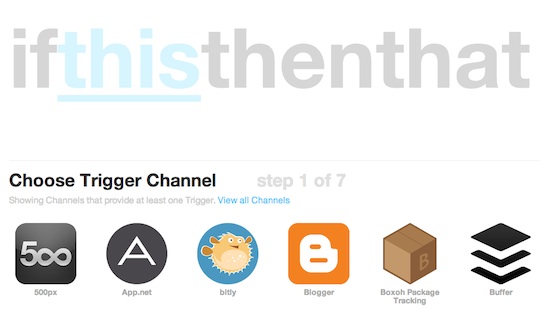
Here’s where the fun begins. Once you click to create a new recipe, you’ll be given the IFTTT option. Click the blue, underlined link that says, “this.” The page should automatically move down to “Choose A Trigger Channel.” IFTTT is full of trigger (this) options and makes it an exciting platform to work with.

IFTTT Trigger Channel to Automate Twitter
IFTTT.com Trigger Channel – Select RSS “Feed”

For this step, we want to choose feed (the RSS icon). By selecting feed, IFTTT will know that the automation process starts with your website’s publication of stories. The page will automatically scroll down further and you will be given two options. Choose “New feed item.” For me, I would navigate to my site’s feed, copy it, and paste it into the box shown below.

IFTTT Trigger RSS Feed Automate Twitter
IFTTT Trigger RSS Feed

At this point, you’re nearly there! By selecting “Create Trigger,” the page will have you select would you’d like to do with it. You might assume that you’d select Twitter for your “action channel,” but you shouldn’t. If you want to include Twitter @ symbols, you’ll need to choose Buffer. Buffer is an application that can take your automated tweets and space them out over time and give you in-depth statistics on the success of certain stories. If you don’t have your account attached to IFTTT or haven’t ever used Buffer, it will ask to pair the accounts. You’ll need to register with your Twitter account on Buffer and then link to IFTTT. Once you’ve done that, you’ll be able to select “Add to Buffer.”

Choose Buffer App to Automate Twitter via IFTTT
IFTTT Buffer App Choice

When you are ready to “Add,” click the entry title and entry URL area and add “via @YOURTWITTERNAMEHERE.” Click “Create Action” and then “Create Recipe.” Once you hit that, you’re all done! You’ve created your very first automated Twitter recipe. Your RSS feed will update IFTTT, which will send a notification to Buffer for Twitter publication. While it sounds complicated – technically, it is – the process will save you hours and hours over the course of your site.

Sharing Is Caring

Beyond automating your own Twitter and site, people often automate other people’s websites and blogs. Sharing is caring when it comes to this. When you share someone else’s blog automatically, they will be inclined to share your work and visit your site. Do them a favor and you may just get one in return. If not, it makes for good karma.

Hope this little how to and tutorial helps! If you have any questions, don’t hesitate to leave a comment!

Filed Under: Make Money Tagged With: apps, automate, buffer, gain twitter followers, ifttt, Make Money, media, social networking, twitter

Best Brokers For Commission-Free ETFs

By Frugaling

Share This:

New York Stock Exchange NYSE Broker ETFs
Photo: Wikipedia/Library of Congress

Little funds, big investments

Despite great strides to make the market more friendly to those with lesser funds, it is frequently stacked against the little player. Before I was in debt, I had a paltry sum money to invest. Wanting to avoid the hassle of reporting tax gains and losses from stock trades, I decided to open a Roth IRA. There was only about $1,000 in my initial deposit.

The commissions from my initial broker made trading cost-prohibitive. Every trade was about 1% of my total account value (~$10). If I wanted to realize gains on one share of a $100 stock, I needed to wait for it to climb 20 points (ten for purchase and ten for sale). With $1,000, it becomes very difficult to invest diversely and smartly. This was a recipe for disaster, until I found commission-free ETFs.

The advantages of commission-free ETFs

For me, as a small player in the market with scarce time for research in individual stocks, it’s important to save money in trading fees and pick more diverse index funds. Mutual funds are great as a diversification strategy, but often require a sizeable sum to start. That’s where commission-free ETFs come into the picture. 

In 2008, ETFs became a popular way to purchase managed (someone controls what the index is invested in) funds on the open market with live pricing; unlike mutual funds, which NAV prices update only once a day. They’re easy to trade right on the traditional exchanges, and instantly diversify your portfolio, while giving you the choice in a variety of broad-market sectors.

As the popularity rose, brokers took a keen interest in attracting new customers by offering free trades in certain ETFs. There are serious considerations to make before investing in any of these commission-free ETFs. Despite the diversification, these investments still have sizable risk and still require some research. That being said, commission-free ETFs can be a tremendous way to begin investing, diversifying your holdings, and saving money.

The Top 3 Commission-Free ETF Brokers

1. TD Ameritrade

TD Ameritrade offers 101 options and some of the biggest names are included: iShares, PowerShares, SPDR, and Vanguard. The list is a collection of Morningstar reviewed and recommended ETFs and most of them have small expense ratios (especially Vanguard ETFs). Account minimums and flexible investment options make TD Ameritrade a solid trading platform. Accounts include free CNBC TV, as well.

2. Vanguard

Expense ratios at Vanguard have always been notoriously low. They pride themselves on being affordable and smart for the average investor. This fairness easily makes Vanguard a great option for commission-free ETFs. Their group of about 45 ETFs are all free to trade within a Vanguard account. The only reason this doesn’t rank higher on the broker list is because TD Ameritrade accounts already have access to most of these funds.

ETrade Investment Platform Broker Deal - 60 Days Free Trading!3. E*Trade

E*Trade is the stalwart of online brokers. They’ve been around since the beginning. This broker offers about 90 commission-free ETFs from DB-X, Global-X, and WisdomTree. The largest concern with E*Trade is that these funds tend to have larger expense ratios. E*Trade offers an incredible mobile trade platform and terrific customer service. Opening a new account is easy to do.

Important considerations before you invest

Despite this great convenience and ease, here are three concerns to watch out for:

  1. Some ETFs are traded sparingly. This liquidity problem may lead to great differences between bid/ask prices, and a trade that isn’t in your favor. Consider the volume traded each day in the ETF you hope to invest in.
  2. Commission-free ETFs aren’t a good way to daytrade, as some companies (i.e., TD Ameritrade and E*Trade) charge an exit fee for ETFs held less than 30 days.
  3. Beware of exploitative expense ratios. ETFs, like any other fund, charge a commission for the privilege of diversification and sometimes  active management. These fees may add up over the long-term (See E*Trade as an example).

Have you ever invested in commission-free ETFs? What’s been your experience? Need some help further understanding ETFs? Read this book.

Filed Under: Make Money, Save Money Tagged With: Ameritrade, broker, charles schwab, CNBC TV, commission-free, etf, etrade, Free, Freebies, TD, Vanguard

Why I Bought One Share Of Google (GOOG)

By Frugaling 15 Comments

Share This:

Google Logo

The smart portfolio is a diversified portfolio

Investing is a tough business. Most people tend to float around with average gains of the stock market – influenced by the leading indicators – because they buy mutual funds and exchange traded funds (ETFs). Those that buck the greater system, choose individual stocks, and don’t diversify their portfolios run the risk of losing it all – making it a game of chance.

Previously, I wrote about how you must have a certain amount of money in an investment account before you can make smart decisions. When you only have about $1000, as I do, there’s little that can be invested well; plus, the trading fees eat up any minor gains (or increase losses). Nowhere is the trite cliche of “it takes money to make money” more vital than the stock market.

Take a risk, play it straight, or go with what I know?

Because of the financial situation I’m in, I do not really have the privilege of a well-diversified and balanced portfolio. Moreover, I wish I could take it out and pay off $1000 in student loans (that are receiving active interest at 6.8%). But the money is caught up in an IRA with painful tax and growth implications if I withdraw it now. It’s easier to put this money to good use in the market.

I was invested in a lot of tiny ETF positions in my Vanguard Roth IRA, in an abysmal attempt to diversify. Mostly, it was working. The money was slowly adding up, but I found moral complications in some of the holdings within these ETFs. I honestly didn’t agree with some of the companies business decisions, and I felt complicit in supporting these practices.

That left me sort of in the lurch. Where should I make the most of my money with a company I support? One company stood out in my mind because I agreed with their business practices and supported their vision. Also, as a tech geek, I felt like I could conceptualize the mission.

Cr-48 Chromebook Google FreeHello, Google. I own you.

The only company that made sense to me was Google. Trading around $1050 per share, this was an expensive stock (~30x EPS). Investors were suggesting that this was a growth stock that’d be going places beyond search advertising revenue. But I had recommended the GOOG monster to someone a little while back, and completely missed a rise from $800. Something told me the run wasn’t done.

On December 4th, 2013, I purchased one share at $1051.37. Now, my entire portfolio was condensed into one bet, share. I cannot recommend this investment technique from a risk perspective, but I felt like I understood the mood around this company and its leadership.

As a nerd of the highest order, I naturally paid attention to Google products, developments, and releases – no matter if I could afford them. Back in college, I was even given a free Chromebook (the Cr-48) from Google for testing purposes. More than any company before, Google made sense to me, and I used a ton of their products. So, I pulled the trigger.

What I learned from the decision

This was a risky decision; mind you, one that paid off. The Google share has risen about $100 over my original purchase price and investors continue to be optimistic about the growth. The company is on track to deliver driverless cars in 3 to 5 years, researching how to make people live longer, and investing heavily via Google Ventures (which just helped swallow up Nest).

Have you ever considered investing in Google? What stops you if you haven’t?

Filed Under: Make Money Tagged With: diversify, ETFs, GOOG, Google, money, Stock Market, stocks, Student Loans

  • « Previous Page
  • 1
  • …
  • 8
  • 9
  • 10
  • 11
  • 12
  • …
  • 28
  • Next Page »

Follow

  • Facebook
  • Google+
  • Pinterest
  • RSS
  • Twitter

Subscribe

Best Of

  • Was Albert Einstein A Minimalist?
    Was Albert Einstein A Minimalist?
  • Is Frozen Juice Cheaper?
    Is Frozen Juice Cheaper?
  • 8 TED Talks That Will Inspire You To Become A Minimalist
    8 TED Talks That Will Inspire You To Become A Minimalist
  • My Low-Income Lifestyle
    My Low-Income Lifestyle
  • The New Rich: How $250k A Year Became Middle Class
    The New Rich: How $250k A Year Became Middle Class
  • My Amazon Kindle: A Eulogy
    My Amazon Kindle: A Eulogy

Recent Posts

  • Débuter en photographie sans se ruiner
  • How to Eat Healthy on a Budget
  • How To Live Stream Your Art
  • 5 Fun Summer Activities on a Budget
  • How to Pay Off Medical Debt

Search

Archives

  • August 2025 (1)
  • June 2023 (1)
  • May 2023 (2)
  • January 2023 (1)
  • March 2022 (3)
  • February 2022 (2)
  • November 2021 (1)
  • October 2021 (2)
  • August 2021 (4)
  • July 2021 (5)
  • June 2021 (3)
  • May 2021 (2)
  • January 2021 (2)
  • December 2020 (2)
  • October 2020 (2)
  • September 2020 (1)
  • August 2020 (3)
  • June 2020 (1)
  • May 2020 (2)
  • April 2020 (1)
  • February 2020 (2)
  • January 2020 (1)
  • December 2019 (1)
  • November 2019 (5)
  • September 2019 (4)
  • August 2019 (1)
  • June 2019 (1)
  • May 2019 (1)
  • April 2019 (1)
  • March 2019 (3)
  • February 2019 (1)
  • January 2019 (3)
  • December 2018 (1)
  • September 2018 (2)
  • July 2018 (1)
  • June 2018 (2)
  • May 2018 (1)
  • April 2018 (5)
  • March 2018 (6)
  • February 2018 (4)
  • January 2018 (1)
  • December 2017 (10)
  • November 2017 (3)
  • July 2017 (2)
  • June 2017 (5)
  • May 2017 (2)
  • April 2017 (8)
  • March 2017 (4)
  • February 2017 (3)
  • January 2017 (2)
  • December 2016 (2)
  • November 2016 (4)
  • October 2016 (2)
  • September 2016 (1)
  • August 2016 (4)
  • July 2016 (1)
  • June 2016 (3)
  • May 2016 (3)
  • April 2016 (4)
  • March 2016 (5)
  • February 2016 (2)
  • January 2016 (2)
  • December 2015 (3)
  • November 2015 (5)
  • October 2015 (5)
  • September 2015 (4)
  • August 2015 (6)
  • July 2015 (8)
  • June 2015 (6)
  • May 2015 (14)
  • April 2015 (14)
  • March 2015 (13)
  • February 2015 (12)
  • January 2015 (15)
  • December 2014 (10)
  • November 2014 (5)
  • October 2014 (6)
  • September 2014 (7)
  • August 2014 (12)
  • July 2014 (11)
  • June 2014 (12)
  • May 2014 (16)
  • April 2014 (13)
  • March 2014 (13)
  • February 2014 (9)
  • January 2014 (20)
  • December 2013 (9)
  • November 2013 (18)
  • October 2013 (15)
  • September 2013 (11)
  • August 2013 (11)
  • July 2013 (27)
  • June 2013 (18)
  • May 2013 (16)

Best Of

  • Was Albert Einstein A Minimalist?
  • Is Frozen Juice Cheaper?
  • 8 TED Talks That Will Inspire You To Become A Minimalist

Recent Posts

  • Débuter en photographie sans se ruiner
  • How to Eat Healthy on a Budget
  • How To Live Stream Your Art

Follow

  • Facebook
  • Google+
  • RSS
  • Twitter

Copyright © 2026 · Modern Studio Pro Theme on Genesis Framework · WordPress · Log in